
It is 10 PM. You have a presentation to finish, a chapter to revise and an assignment that still needs proper research. You open another browser tab, search for a solution and somehow end up with even more information to sort through.
Most students have experienced some version of this.
Artificial intelligence can make these tasks easier, but only when you know which tool to use and what to ask it to do. A chatbot that explains economics is not necessarily the best choice for reviewing a research paper, and a presentation generator will not automatically help you remember what you studied.
That is why this guide focuses on 10 AI tools for students in 2026, with a specific purpose for each one. You will learn what the tools can do, where they are useful, which limitations to consider and how to use them without becoming dependent on AI-generated answers.
Quick Answer: What Are the Best AI Tools for Students in 2026?
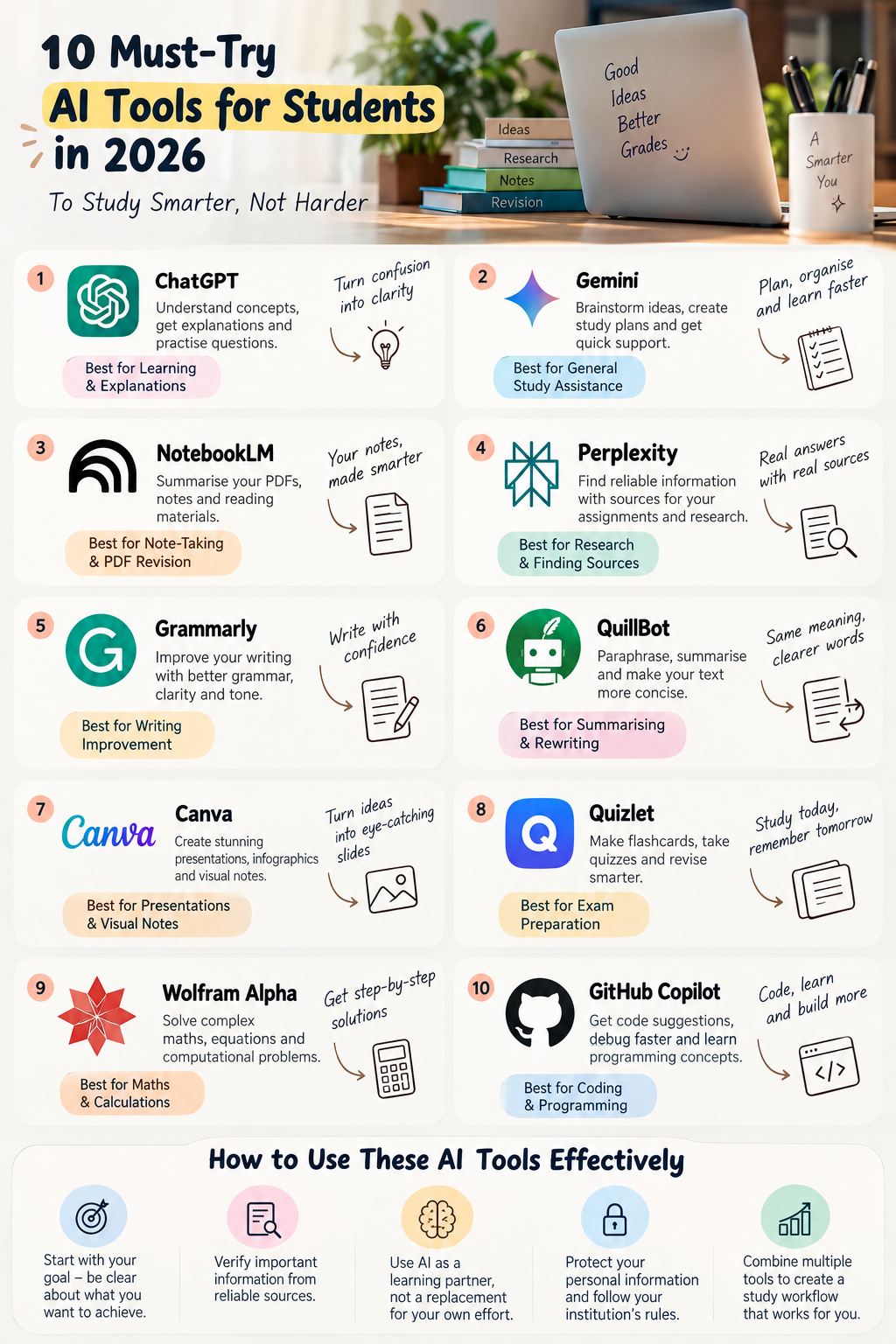
The best AI tools for students depend on the task. ChatGPT is useful for understanding difficult concepts, NotebookLM for working with study materials, Perplexity for researching information, Grammarly for improving writing and Quizlet for revision through flashcards.
Other useful options include Google Gemini, QuillBot, Canva, Wolfram Alpha and GitHub Copilot. Most students do not need all ten. Choosing two or three tools that solve their biggest study problems is a more practical starting point.
Comparison of the 10 Best AI Tools for Students
| AI tool | Best use | What it helps with |
|---|---|---|
| ChatGPT | Learning and explanations | Understanding concepts and practising questions |
| Google Gemini | General study assistance | Brainstorming, explanations and study planning |
| NotebookLM | Notes and PDFs | Summaries and source-based questions |
| Perplexity AI | Research | Finding information and exploring sources |
| Grammarly | Writing improvement | Grammar, clarity and readability |
| QuillBot | Summarising and rewriting | Making text clearer and more concise |
| Canva AI | Presentations | Slides, infographics and visual notes |
| Quizlet | Exam revision | Flashcards and recall practice |
| Wolfram Alpha | Maths and calculations | Equations and computational problems |
| GitHub Copilot | Coding | Code suggestions and debugging assistance |
Free access and advanced features vary by product and plan. Check the official websites before choosing a tool for regular use.
1. ChatGPT: Best for Understanding Difficult Concepts

Website: https://chatgpt.com/
Reading a chapter several times does not always mean you understand it. Sometimes, all you need is a different explanation or a practical example.
ChatGPT can help students break down complicated subjects, ask follow-up questions and practise concepts at their own pace. Instead of searching for a new explanation every time you get stuck, you can continue asking questions until the idea becomes clearer.
What can you use it for?
- Explaining difficult concepts in simpler language.
- Creating revision notes from supplied material.
- Generating practice questions and quizzes.
- Understanding case studies and academic concepts.
- Planning revision sessions before examinations.
Try this prompt:
“Explain the concept of opportunity cost in simple language. Give me an example from everyday life, explain one common misunderstanding and ask me five questions to test my understanding. Do not reveal the answers until I attempt them.”
This approach makes the tool more useful because it encourages you to think rather than simply copy an answer.
One limitation to remember: ChatGPT can produce incorrect facts or reasoning. Check important information against your textbooks, course material or reliable sources. Its Study Mode is also worth exploring if you prefer guided learning.
2. Google Gemini: Best for Everyday Study Assistance
Website: https://gemini.google.com/
Students often need help with several small tasks throughout the day: understanding a topic, organising a project, brainstorming presentation ideas or creating a study timetable.
Google Gemini can assist with these general study activities. It may also be useful if you already work with Google services, although available integrations depend on your account and plan.
What can you use it for?
- Brainstorming assignment topics.
- Creating a revision timetable.
- Explaining concepts with examples.
- Organising project ideas.
- Preparing outlines for college presentations.
Try this prompt:
“I have five chapters to revise before my examination in seven days. Help me create a realistic study timetable with two hours of study each day. Include revision, practice questions and time to revisit difficult topics.”
The advantage is not simply generating a timetable. It is getting a starting plan that you can adjust according to your actual workload.
One limitation to remember: A generated timetable may underestimate how long difficult topics take. Review it against your syllabus and available time.
3. NotebookLM: Best for AI Tools for Note-Taking and PDF Revision
Website: https://notebooklm.google.com/
Imagine having several lecture PDFs, class notes and reading materials to review before an examination. The problem is not always finding information; it is finding the relevant information without rereading everything.
NotebookLM is particularly useful for working with sources you provide. It can help summarise supported documents, answer questions about their contents and organise material into study-friendly formats.
What can you use it for?
- Summarising lengthy lecture notes.
- Reviewing uploaded PDFs and reading materials.
- Finding key concepts within your sources.
- Creating study guides and revision questions.
- Revisiting important information from multiple documents.
Try this prompt:
“Using the uploaded chapter, prepare a one-page revision guide. Include the key definitions, five important concepts, two practical examples and ten questions for self-testing. If a detail is not covered in the source, clearly say so.”
This is a useful way to turn existing material into something easier to revise.
One limitation to remember: Source-based answers can still misunderstand or omit information. Check important definitions, formulas and quotations against the original document.
4. Perplexity AI: Best for Research and Finding Sources
Website: https://www.perplexity.ai/
Research can consume more time than writing itself. You may find several articles about a subject but still need to determine which sources are relevant and whether they support the point you want to make.
Perplexity searches the web and provides answers with links to sources. This makes it useful when exploring a new topic, preparing an assignment outline or finding material for a presentation.
What can you use it for?
- Exploring unfamiliar research topics.
- Finding relevant articles and reports.
- Investigating current developments.
- Identifying primary sources for further reading.
- Comparing different explanations of an issue.
Try this prompt:
“I am preparing a college assignment on sustainable business practices in India. Find relevant reports, research papers and official sources. Summarise the main findings, provide links to the original publications and distinguish evidence from opinion.”
The important step comes after the search: open the sources and read the relevant sections yourself.
One limitation to remember: Citations do not guarantee accuracy. Check that each source exists and actually supports the statement attributed to it.
5. Grammarly: Best for Improving Academic Writing
Website: https://www.grammarly.com/
You may understand a topic perfectly but still struggle to express your ideas clearly in an assignment or report.
Grammarly helps review spelling, grammar, sentence clarity and tone. It can be useful when polishing a draft, preparing a formal email or reviewing a report before submission.
What can you use it for?
- Correcting grammar and spelling.
- Improving sentence clarity.
- Identifying awkward wording.
- Reviewing the tone of formal writing.
- Making reports easier to read.
Try this prompt or instruction:
“Review my paragraph for grammar and clarity. Preserve my original meaning and technical terms. Explain the three most important improvements instead of rewriting the entire paragraph.”
This encourages you to learn from the corrections instead of accepting every suggestion automatically.
One limitation to remember: Writing suggestions can change the meaning or tone of a sentence. Review the final version yourself, especially when working on academic arguments.
6. QuillBot: Best for Summarising and Rewriting Text
Website: https://quillbot.com/
Sometimes your notes contain too much information, or a sentence is difficult to understand even though the underlying idea is straightforward.
QuillBot offers writing tools, including paraphrasing and summarisation, that can help make text more concise and readable.
What can you use it for?
- Condensing lengthy passages into revision notes.
- Simplifying complicated sentences.
- Exploring alternative ways to express an idea.
- Improving the readability of a draft.
- Summarising material for personal revision.
Try this instruction:
“Help me simplify the following passage into revision notes. Preserve its key facts, technical terms and original meaning. Flag any detail that might be lost when shortening the text.”
One limitation to remember: Rewriting a source does not remove the need to acknowledge it. Understand the material and cite the original source wherever required by your institution.
7. Canva AI: Best for Making Presentations and Visual Notes

Website: https://www.canva.com/
A good presentation is not simply a document divided into slides. It needs a clear story, readable information and visuals that help the audience understand the topic.
Canva provides design tools and AI-assisted features that can help students create presentations, infographics, diagrams and other visual materials.
What can you use it for?
- Creating presentation layouts.
- Designing infographics for assignments.
- Turning key concepts into visual summaries.
- Organising project information into diagrams.
- Preparing posters and other educational materials.
Try this prompt:
“Create a six-slide presentation outline on the impact of artificial intelligence on business. Include an introduction, three main insights, one real-world example and a conclusion. Keep each slide focused on one idea.”
Use the outline as a starting point, then verify the facts and design the slides to fit your actual assignment.
One limitation to remember: AI-generated layouts and text may need substantial editing. Check facts, image permissions and the availability of specific features before submitting your presentation.
8. Quizlet: Best for Flashcards and Exam Preparation
Website: https://quizlet.com/
Reading your notes repeatedly can create a feeling of familiarity without necessarily helping you recall the information during an examination.
Flashcards encourage active recall: you try to retrieve the answer before looking at it. Quizlet supports flashcard-based learning and other revision activities, with feature availability depending on the current plan.
What can you use it for?
- Memorising definitions and terminology.
- Revising important dates and formulas.
- Testing knowledge after completing a chapter.
- Reviewing concepts that are easy to forget.
- Building question-and-answer study sets.
Try this approach:
Take a chapter on business management and create flashcards for its key theories, definitions and examples. Attempt each card before revealing the answer, and revisit the ones you get wrong.
One limitation to remember: Flashcards are particularly useful for recall, but they cannot replace solving full problems, writing long answers or practising application-based questions.
9. Wolfram Alpha: Best for Maths and Computational Problems

Website: https://www.wolframalpha.com/
Mathematics, statistics and quantitative subjects often require more than a verbal explanation. You may need to check a calculation, evaluate an equation or investigate a mathematical relationship.
Wolfram Alpha is a computational knowledge tool that can help with supported mathematical and technical problems.
What can you use it for?
- Checking algebraic expressions.
- Exploring equations and functions.
- Performing mathematical calculations.
- Investigating selected statistical problems.
- Verifying results during practice.
Try this approach:
Enter a practice equation, examine the result and then solve the problem independently. Compare your working with the available explanation or solution steps.
One limitation to remember: Some detailed solutions and advanced capabilities may require a paid plan. A correct final answer also does not guarantee that you understand the method used to obtain it.
10. GitHub Copilot: Best for Coding and Programming Practice
Website: https://github.com/features/copilot
Learning to code involves more than writing syntax. Students need to understand how programs work, identify errors and learn why one solution is better than another.
GitHub Copilot can suggest code, assist with programming tasks and help developers investigate errors. It can be useful when learning a new language or working on a software project.
What can you use it for?
- Understanding unfamiliar code.
- Exploring alternative programming approaches.
- Investigating possible bugs.
- Generating example code for practice.
- Learning how functions and programming concepts fit together.
Try this prompt:
“Explain this Python function line by line. Identify any potential errors, suggest two test cases and explain the reasoning behind a possible fix. Help me understand the solution rather than just replacing my code.”
One limitation to remember: Generated code can be incorrect or insecure. Test it, understand it and check the relevant rules before using AI assistance in assessed coursework.
Which AI Tools Are Actually Free for Students?
Several of these products offer free access or limited free features, but the exact restrictions differ.
| Tool | What to check before using it |
|---|---|
| ChatGPT | Message limits and access to advanced features |
| Google Gemini | Account eligibility and feature limits |
| NotebookLM | Usage limits and supported source formats |
| Perplexity | Search and advanced research limits |
| Grammarly | Availability of advanced writing assistance |
| QuillBot | Limits on paraphrasing and summarisation |
| Canva | Availability of premium design and AI features |
| Quizlet | Access to advanced study modes |
| Wolfram Alpha | Availability of step-by-step solutions |
| GitHub Copilot | Eligibility, usage limits and plan requirements |
A free plan may be enough for occasional study sessions. Before paying for a subscription, identify the task you need it for and check whether the free version already meets that need.
How to Combine AI Tools Into One Study Workflow
The real benefit of AI tools for studying comes from using them in a sensible sequence rather than opening a different app for every small task.
Consider a student preparing for a business management examination.
Step 1: Understand the topic. Ask ChatGPT or Gemini to explain a difficult concept with an example.
Step 2: Organise your material. Use NotebookLM to review your lecture notes and identify the important points covered in your course documents.
Step 3: Research supporting information. Use Perplexity to locate relevant reports or examples. Open the original sources and verify their claims.
Step 4: Test your memory. Create flashcards or ask an AI assistant to quiz you without showing the answers immediately.
Step 5: Review your written work. Use Grammarly to identify clarity and grammar issues in your own draft.
Step 6: Practise without assistance. Close the tools and answer questions independently. This helps reveal what you have actually understood.
You do not need six subscriptions to follow this process. A small combination of suitable free tools may be sufficient.
How to Use AI Tools Without Hurting Your Learning
AI can make studying more convenient, but convenience is not the same as understanding.
A recent news report discussing research on AI use in education highlighted a potential trade-off: unrestricted assistance may improve the appearance of homework while weakening learning outcomes if students become dependent on generated answers. The lesson is to use AI in ways that preserve independent thinking. Read the report in The Times of India.
Here are five practical rules.
1. Attempt the problem first. Try answering a question before asking AI for help. You will learn more from an explanation when you know exactly where you got stuck.
2. Verify important information. Check statistics, quotations, citations and technical explanations against reliable original sources.
3. Protect your information. Avoid uploading sensitive personal information or confidential documents without understanding the tool’s privacy terms.
4. Follow your institution’s rules. Check which forms of AI assistance are permitted and whether disclosure is required for assignments or research.
5. Learn from corrections. When an AI tool improves a paragraph or solves a problem, ask why the change works. Understanding the reasoning is more valuable than copying the result.
Frequently Asked Questions About AI Tools for Students
1. What are the best AI tools for students in 2026?
ChatGPT, Google Gemini, NotebookLM, Perplexity and Quizlet are useful starting points for explanations, source-based revision, research and flashcards. Grammarly, QuillBot, Canva, Wolfram Alpha and GitHub Copilot offer more specialised support for writing, presentations, calculations and coding.
2. Which AI tools for students are free?
Several popular tools provide free access or limited free features, including ChatGPT, Google Gemini, NotebookLM and Perplexity. Grammarly, QuillBot and Canva also offer selected free capabilities. Availability and usage limits can change, so check the official pricing pages before relying on a feature.
3. Which AI tool is best for making study notes?
NotebookLM is useful for creating summaries and asking questions about supported documents you provide. ChatGPT and Gemini can also help organise notes and generate revision questions. Always check the output against your original course materials.
4. Which AI tools are best for exam preparation?
ChatGPT and Gemini can explain difficult concepts and generate practice questions, while NotebookLM can help review course documents and Quizlet can support flashcard-based revision. Choose the tools that fit your subject and examination format.
5. Which AI tool is best for academic research?
Perplexity is useful for exploring web sources and discovering relevant material. NotebookLM can help analyse documents you supply. Neither tool replaces reading original research, checking source quality or following the citation requirements of your institution.
6. Can AI tools help with college assignments?
Yes. AI tools can assist with brainstorming, research, outlining, writing feedback and presentation planning. Students should develop their own arguments, verify the information and follow their institution’s rules on AI-assisted work.
7. Are AI-generated answers always accurate?
No. AI systems can produce incorrect statements, outdated information or misleading citations. Verify important claims against textbooks, official publications and original research before using them in academic work.
8. Can AI tools replace traditional studying?
No. AI tools can support explanations, revision and practice, but they cannot replace the need to understand concepts, solve problems independently and develop critical thinking.
Final Thoughts
The best AI tool is not necessarily the one with the most features. It is the one that solves a problem you actually face while helping you understand the subject better.
If you struggle with difficult concepts, start with ChatGPT or Gemini. If your notes are difficult to organise, try NotebookLM. For research, explore Perplexity, and for revision, consider Quizlet.
Choose a small set of tools, experiment with them on real study tasks and keep checking whether they are helping you learn.
Use AI to make studying more effective, not to avoid studying altogether.
Leave a Reply